GTD – filing

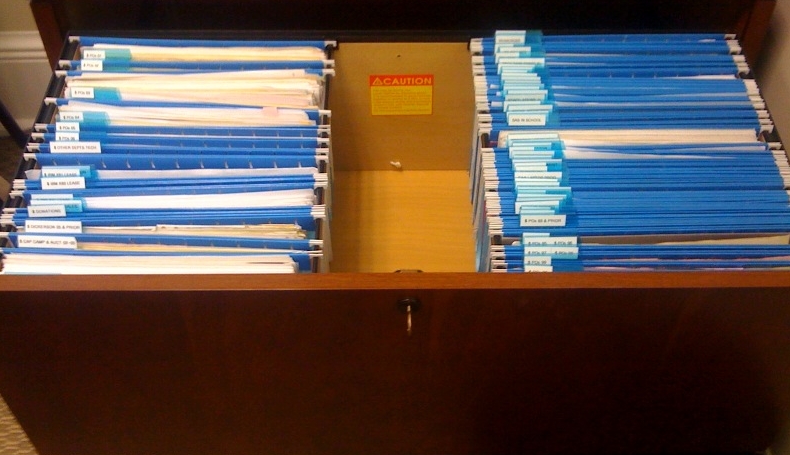
For my second post on my adventures with GTD, I’m talking about filing.  Prior to reading Getting Things Done, my file cabinet was very tidy, but not really easy to navigate.  Each draw held a category of file and trying to keep the pop-in tabs of my hanging files staggered was impossible.  David Allen recommends a simpler method that includes straight alphabetization and skipping the staggered tabbing.  I won’t give away too much from the book, but these are some of my files now.

Photo

Not only can I find everything, but I can tell someone else exactly where to find a specific file – what drawer, what the label it is under and in some cases whether it is in the front or back of the folder. This came in handy during my recovery from surgery recently when members of my team needed essential files immediately.

This paper management system has been extremely helpful.  Beyond that, I’ve stared down the road of digitization when my school got new copiers with high-speed scanning to PDF.  Many essential files are now scanned to PDF and stored electronically.

Tomorrow, I’ll share how I started GTD with a paper system for about $5.  After that, I’ll share how that system has morphed into an electronic system that incorporates Outlook and my iPhone.

GTD

If you haven’t read Getting Things Done by David Allen, go get it now.  I love to organize and I love to find ways to be more efficient and aid others in doing the same.  However, many books on organization and “time management” are so corporate in their focus that they simply can’t help those of us in the non-profit and education world.  After reading so many books that encouraged me to focus on my company’s bottom line and didn’t take into account that I had to schedule my day around class, assemblies, chapels, and other meetings that I can’t control, I was fed up.  Enter David Allen.


Getting Things Done is based on the idea that you must have a fool-proof system for tracking to-do’s, including those that other people are to-doing for you.  The book gives you a way to design your own system, using any tool – analog or digital, that you believe will work best for you.  It has truly made a difference in my life.


If you are serious about getting a handle on your day, week, and month.  Seriously, stop reading this blog and go get a copy (but then come back and finish).  While you are out, get an electronic label maker, a few pens you like, and a nice latte (or green tea or whatever floats your boat).  Read the book once before trying to implement the practices David Allen outlines.  Then, get ready to take control of your inbox.


For the next couple of days, I’ll be sharing some of the successes that I’ve had implementing GTD, including revamping my file systems and getting a better handle on my to-do list.

iHeart my iPhone

Thanks to all who Tweeted about the iPhone/iTouch session today at NECC.  If you haven’t already, visit http://ieducation.wikispaces.com/, a wonderful wiki from the session.

I’ve had my iPhone for a year and it is the only handheld device I’ve every used successfully.  It syncs beautifully with Exchange 2007, bringing me my mail, calendars and contacts.  My one complaint with this integration is that Active Sync with the iPhone doesn’t sync the notes or tasks, which I use extensively.  I don’t have a solution for the notes but I’m currently using toodle-do as a middleware to sync my tasks.  It’s clunky, but it works.

Some of my personal and productivity apps include

  • Tweetie for Twitter access
  • Facebook
  • WRAL News – my local new channel’s iPhone app
  • PhoneFlix to manage my Netflix queue
  • Free Ping to ping my network

Until recently, I hadn’t done much to introduce the iPhone into my classroom.  However, after nine years of teaching computer science, I may be adding chemistry to my list of courses in the upcoming school year.  This prompted me to look for apps that might be applicable to my new subject area.  Recent downloads:

  • The Chemical Touch Lite – an amazing (free!) periodic table.  This is a wonderful app.  It allows you to view the Mass, Density, Melting Point, Boiling Point, Radius, and Electronegativity of each element.  With a simple touch, you can move from the table to the wikipedia article on that element.  Waiting in the doctor’s waiting room last week, I learned all about Technetium using this resource.  Unsurprisingly, I chose it because it was tech-net-ium.
  • Stoichiometry simulator by T.J. Fletcher.  This is a beautifully designed app. The Lab Manuals are clearly written and the simulator is easy to use.  I look forward to seeing how this will apply in class.
  • Calorimetry Simulator by T.J. Fletcher.  Also nicely done with an attractive design and a clearly written help file that explains calorimetry.  The program includes simulations for several known metals and then three unknowns.  Also looking forward to using this simulator.

I’m also looking into whether the programming of Apps would be a good introductory programming class for our school.  I believe that it would be attractive to our students.  Information gleaned from the iPhone developer site indicates that you must be programming on a Mac.  As a dedicated Tablet PC school, this would be a deal-breaker.  My Apple rep is checking, so I’m hoping that there is a solution.

So why do iHeart my iPhone?  It’s easy.  Exchange integration is easy.  Getting apps is easy.  The interface is easy.  Are there things that I’d love to see added (Flash integration in Safari, copy/paste, the aforementioned notes and tasks), but overall, it is fabulous!

Why “Tech Life Balance?”

Note: This post was the initial post on a blog I had from 2009-2011 entitled “Tech Life Balance.”

One of the most frequent questions that parents ask me is how to tell if their girls are spending too much time online or how to curtail the amount of time they spend online with Facebook, IM and similar applications.  I have a series of tools and tips for these parents to use in collaboration with their daughters to keep the virtual from getting in the way of family time or academic work.  This post doesn’t include those tips, but I will endeavor to post them in the future. Additionally, I know that the division between virtual and real, and between home/school/work is getting narrower if it even exists at all.  I know that students can use IM to collaborate on assignments.  None of that is the point.

I am very connected and all of my devices are multi-purpose.  My husband has six computers: Work tablet, work desktop for photo/video editing, home laptop, netbook (for controlling his flash systems), audio processing rack-mount “desktop” and a cute shuttle for his extensive music collection.  Oh, and his iPhone. I (the head of technology department) have my Lenovo X61 tablet and an iPhone.  Clean and simple, yes, but it also means that I am connected at all times.  I check my email after my second sip of coffee and don’t turn it off until I go to bed.  Unobsessed with Facebook, I check it only twice a day and can usually spend a maximum of ten minutes logged in.  In the morning I read local news online, BBC, and Slate.  I actually have to make a point to check Twitter, which I should do more often.  It doesn’t sound like I’m lacking for tech life balance does it?

But I am.  Technology is my job.  Technology is my leisure.  I carry my iPhone at all times because I am on call.  Most of my email requires a response and many messages each day are requests for assistance.  So, my students have Facebook and I have email.

So, one aspect of tech life balance is about unplugging.  While recovering from a recent surgery, I was off-line for nearly seven days.  I hadn’t been unplugged for that long in ten years and may not be again for another ten, but it helped me realize that I could unplug to rest and restore.  If I can do that, I can unplug to go to a movie, to the gym, to cook dinner, or to paint.

Another aspect is about the role of technology in our lives.  My life, yes, but also my students lives.  In my classroom and in other classrooms.  Is it just as good to watch a Chemistry experiment online as it is to do it in real life?  Can I help my students learn with virtual tools as effectively as when I am there beside them in a tutoring session?  What will make a girl decide to take programming instead of other elective?  How can I use technology to implement systems that make things more efficient and easier?

Thus, tech life balance is the name of this blog.  In one sense, it is tech/life balance and in another it is techlife balance.   Enjoy.